Connection USB-C
Displays Up to 2
Power 85W PD
Driver Native
This page contains affiliate links. We may earn a commission at no extra cost to you. Read our affiliate disclosure.
 By Adrian Cel
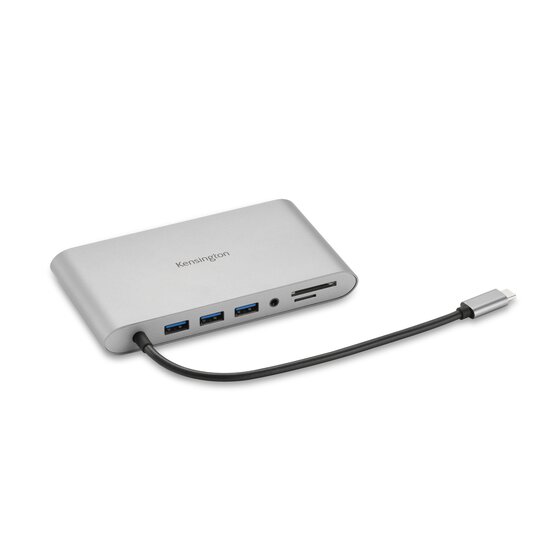
The Kensington UH1400P is a small USB-C travel hub for laptops and tablets that need one HDMI display, wired Ethernet, a few USB-A ports, card readers, and passthrough charging from a single built-in cable. Kensington sells it as the UH1400P USB-C 8-in-1 Driverless Mobile Hub, model K33820WW. The official page lists USB-C DisplayPort Alt Mode, one HDMI 2.0 output up to 3840x2160 at 60Hz, three USB-A 3.2 Gen 1 ports, one USB-C 3.2 Gen 1 port for data and up to 85W USB-C PD passthrough, Gigabit Ethernet, and SD plus microSD 3.0 UHS-I readers. It is driverless, so there is no DisplayLink or Silicon Motion software layer. Your laptop's USB-C port must provide native video output for HDMI to work. Amazon's US listing confirms ASIN B09C8Y432J and showed a 4.4-star rating from 131 reviews during research, while Kensington's store listed the hub at $79.99.
Workaround: Use this for a one-monitor travel setup. Choose Kensington's UH1440P, a DisplayLink dock, or a Thunderbolt dock if you need two screens.
Workaround: Connect fast external SSDs directly to a 10Gbps, USB4, or Thunderbolt port when transfer speed matters.
Workaround: Pair the hub with a 100W USB-C PD charger if you want the best chance of reaching the 85W passthrough target.
Workaround: Use the laptop's original charger or a higher-output dock for power-hungry 15-inch and 16-inch systems.
Workaround: Use a UHS-II reader if card transfer speed is part of your daily workflow.
| General | |
| Manufacturer | Kensington |
| Model | K33820WW |
| Release Date | 2021 |
| MSRP | $79.99 |
| Connectivity | |
| Host Connection | USB-C |
| Max Data Rate | 5 Gbps |
| Driver Required | No (native) |
| Display Output | |
| Max Displays | 1 |
| 1x Display | 3840x2160 @ 60Hz (Single HDMI 2.0 output up to 4K@60Hz on a compatible USB-C DisplayPort Alt Mode host. Samsung DeX is limited by Kensington to one display at up to WQHD.) |
| Ports (5+ total) | |
| USB-A 3.2 | 1x (7.5W) |
| USB-A 3.2 | 2x (4.5W) |
| USB-C 3.2 | 1x (85W) |
| HDMI 2.0 | 1x |
| Ethernet (RJ45) | 1x 1 Gbps |
| SD Card Reader | 1x |
| microSD Card Reader | 1x |
| Power | |
| Power Input | USB-C |
| Laptop Charging | Up to 85W |
Kensington lists Windows 7 or above. Windows 11 Snap Layouts and Snap Groups are called out on the official product page. HDMI still requires a host USB-C port with DisplayPort Alt Mode.
Kensington lists macOS 10.13 or above. It works as a single-display native USB-C hub and does not bypass any Mac external-display limit.
Kensington lists ChromeOS 44 or above. Chromebook support depends on USB-C DisplayPort Alt Mode and Power Delivery support in the host.
Kensington lists Android 9 or later and Samsung DeX support. DeX is limited to one external display at HD+, FHD, or WQHD with a 16:9 aspect ratio.
No HDMI output
Only one external display is supported
85W passthrough may not keep up under load
USB data is limited to 5Gbps
Very Good
The UH1400P makes the most sense as a laptop-bag hub, not a permanent desk dock. It gives you the ports people still ask for in hotel rooms, classrooms, shared offices, and conference rooms: HDMI, Ethernet, USB-A, and card readers. The 25cm built-in cable is more useful than the tiny pigtails on cheap hubs, and the 4K 60Hz HDMI output is a real upgrade over older 4K 30Hz adapters. Kensington also gets the basics right with a metal-feeling compact body, a two-year warranty, and simple plug-and-play setup. The trade-offs are also clear. This is still a 5Gbps USB-C hub. It supports one external display, not dual monitors, and the USB-C power adapter is sold separately. The 85W passthrough ceiling is fine for many MacBook Air, MacBook Pro 14, Dell XPS, Surface, HP, and Lenovo ultraportable setups, but it is not enough headroom for every 16-inch workstation under load. The SD and microSD readers are UHS-I, so photographers moving large cards will want something faster. Buy the UH1400P if you want a compact, driverless, one-monitor hub with Ethernet and card readers. Skip it if you need two monitors, 10Gbps storage, Thunderbolt bandwidth, or 100W-plus laptop charging.


