Connection USB-C
Displays Up to 1
Power 85W PD
Driver Native
This page contains affiliate links. We may earn a commission at no extra cost to you. Read our affiliate disclosure.
 By Adrian Cel
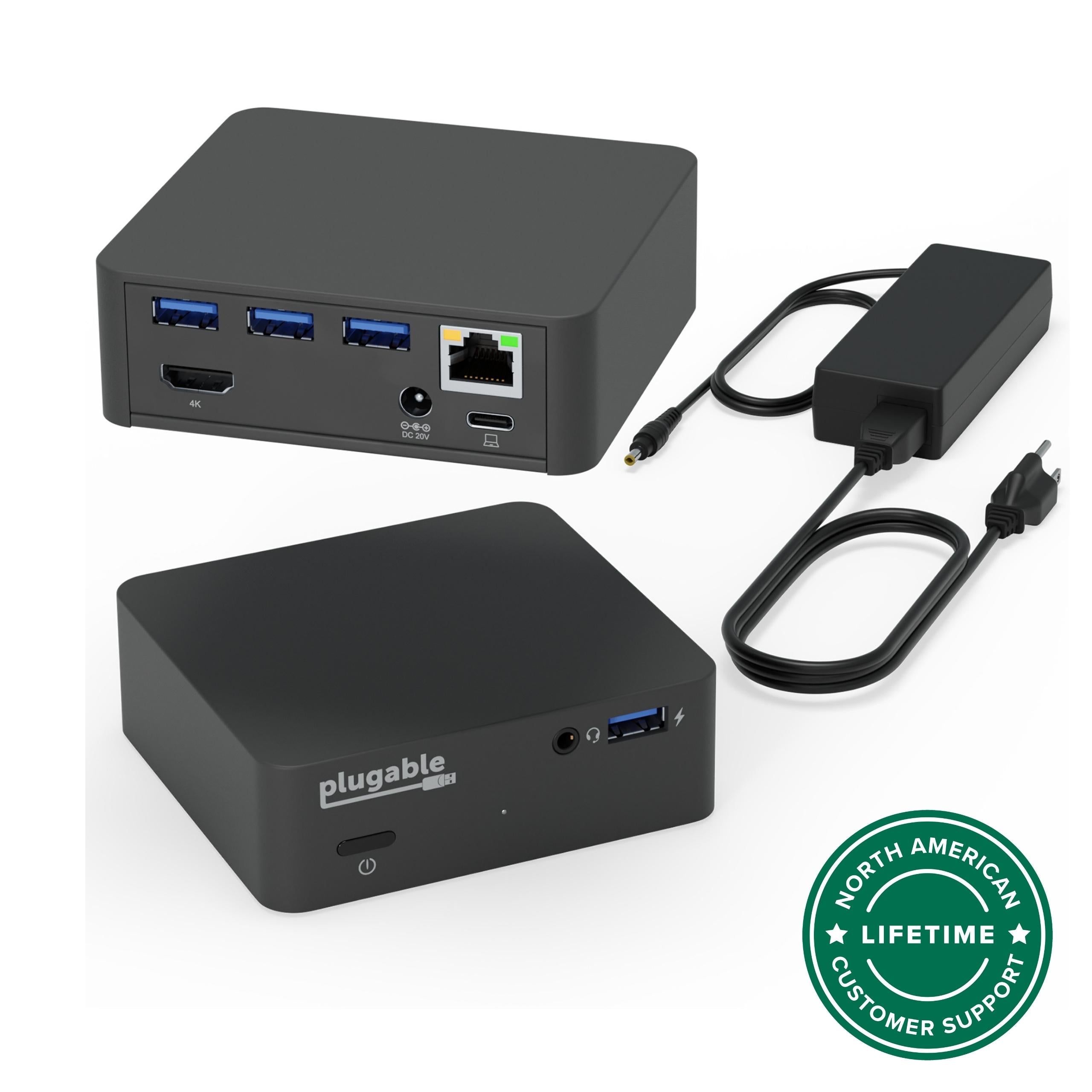
The Plugable UD-CA1A is a simple USB-C desk dock for people who need one HDMI monitor, wired Ethernet, audio, a few USB-A ports, and laptop charging from one cable. It is not a DisplayLink dock and it is not a Thunderbolt dock. The video path uses USB-C DisplayPort Alt Mode from the host, then converts that native signal to HDMI 1.4 inside the dock. On a compatible USB-C, USB4, Thunderbolt 3, or Thunderbolt 4 laptop, that means one external display up to 3840x2160 at 30Hz, or lower resolutions such as 2560x1600, 2560x1440, 1920x1200, and 1920x1080 at 60Hz. Plugable lists the port mix as three USB 3.0 5Gbps Type-A ports, two USB 2.0 480Mbps Type-A ports, Gigabit Ethernet, separate 3.5mm headphone and microphone jacks, one HDMI 1.4 output, and USB-C Power Delivery up to 60W for the host. The box includes the dock, a detachable stand, a 1m USB-C to USB-C cable, an 80W power adapter, and a quick start guide. The stand lets it sit vertically, but the dock can also lie flat on a desk. Amazon lists ASIN B076HXWR9M with a 4.4-star rating from 430 global ratings during this review pass, while Plugable's own page shows the same 430-review Amazon signal and a $74.99 direct price. This is best read as an older, stable, one-monitor office dock with unusually good support documentation, not as a modern multi-display expansion station.
Workaround: Choose a dual-monitor MST dock, DisplayLink dock, USB4 dock, or Thunderbolt dock if two external screens need to run from one cable.
Workaround: Use 2560x1440, 2560x1600, or 1920x1080 at 60Hz, or move to a newer dock with HDMI 2.0 or DisplayPort for 4K 60Hz.
Workaround: Check the laptop manual for DisplayPort Alt Mode and USB Power Delivery input before buying.
Workaround: Use the laptop's original charger for high-power systems or choose a dock with 85W, 100W, or higher USB-C PD.
Workaround: Treat it as a basic one-monitor office dock. Pick a newer 9-in-1 or 11-in-1 hub if card readers and USB-C data are important.
| General | |
| Manufacturer | Plugable |
| Model | UD-CA1A |
| MSRP | $74.99 |
| Connectivity | |
| Host Connection | USB-C |
| Max Data Rate | 5 Gbps |
| Driver Required | No (native) |
| Display Output | |
| Max Displays | 1 |
| 1x Display | 3840x2160 @ 30Hz (Single 4K@30Hz over HDMI 1.4 from a compatible USB-C, USB4, Thunderbolt 3, or Thunderbolt 4 host with DisplayPort Alt Mode.) |
| 1x Display | 2560x1440 @ 60Hz (Plugable lists up to 60Hz at 2560x1600 and lower. The schema uses 2560x1440 for this common QHD class of 60Hz mode.) |
| 1x Display | 1920x1080 @ 60Hz (Single 1080p@60Hz for standard office monitors, conference-room displays, and hosts where 4K 30Hz is not useful.) |
| Ports (6+ total) | |
| USB-A 3.0 | 3x |
| USB-A 2.0 | 2x |
| HDMI 1.4 | 1x |
| Ethernet (RJ45) | 1x 1 Gbps |
| Audio (3.5mm-headphone) | 1x |
| Audio (3.5mm-microphone) | 1x |
| Power | |
| Power Input | DC-barrel |
| Laptop Charging | Up to 60W |
Plugable and Amazon list Windows 10 and Windows 11 support. HDMI output requires USB-C DisplayPort Alt Mode, and host charging requires USB-C Power Delivery input.
Plugable and Amazon list macOS 11 and newer, including Apple Silicon MacBooks. This is a one-display dock and does not bypass base Apple Silicon external-display limits.
Plugable lists ChromeOS 100 and newer. The Chromebook still needs a full-featured USB-C, USB4, or Thunderbolt port for video and charging.
Plugable lists Linux compatibility. HDMI, Ethernet, USB, audio, and charging depend on the laptop's USB-C controller, graphics stack, kernel support, and firmware.
HDMI output will not work
Laptop will not charge from the dock
Only one video output
HDMI 1.4 limit
DisplayPort displays are not supported
Not compatible according to Plugable compatibility copy
Good
The UD-CA1A makes sense when the requirement is narrow: one HDMI display, one wired network jack, headset audio, keyboard, mouse, and 60W laptop charging. It avoids DisplayLink drivers, which can be an advantage on locked-down work laptops and for people who had problems with software-driven display adapters. Amazon customer feedback reflects that split. Recent and older positive reviews praise plug-and-play setup, reliable USB and Ethernet behavior, cool-running hardware, and a DisplayPort Alt Mode video path that solved monitor blackouts for at least one buyer coming from a DisplayLink dock. The trade-offs are just as clear. The dock supports only one external display, the HDMI output is limited to 4K at 30Hz, and charging is capped at 60W. That is fine for many MacBook Air, Chromebook, Surface, Dell Latitude, ThinkPad, and HP ultrabook setups, but it is not enough for a high-power workstation or for anyone expecting dual monitors from one USB-C cable. Plugable's power-delivery knowledge base also frames 60W as a good match for laptops that originally shipped with 45W to 60W adapters, with slower charging possible on systems that normally use larger supplies. Buy the UD-CA1A if you want a driverless, supported, single-monitor USB-C dock and can live with 4K 30Hz. Skip it if you need 4K 60Hz, two displays, DisplayPort output, downstream USB-C, SD card readers, or more than 60W of host charging.



